

Healthcare Wristband Kiosk Terminal Supplier: Key Factors for Hospital Implementation
2026-10-07
The emergency department is not the place to discover your patient ID wristband printer can't handle the morning rush. Yet that's exactly what many hospitals face when they pick a wristband kiosk terminal supplier based on brochure specs alone. From integration with existing EMR systems to thermal print durability, the real-world demands of hospital deployment are unforgiving. BAOBI has worked on enough implementations to know which factors actually predict success. This guide walks through the practical questions every hospital team should ask before committing to a supplier.
Why Wristband Kiosks Are Only as Good as Their Patient ID Workflow
The convenience of a self-service kiosk evaporates the moment a patient's wristband shows the wrong name or medical record number. Kiosks don't verify identity on their own; they inherit whatever data the registration system already holds. If that system has tolerated sloppy matching rules or outdated demographics, the kiosk merely prints those errors in bold, scannable form.
A dependable patient ID workflow starts with how staff search for and select a patient record. That means narrowing matches with more than a last name and birth date, confirming identities against a photo or government-issued ID, and resolving potential duplicates before the visit begins. Without those steps, the kiosk turns into a fast lane for creating duplicate charts and mismatched orders.
The wristband itself doesn't fail because the printer jams or the barcode wears off. It fails because the workflow behind it allowed an uncertain match to become a permanent identifier. Fixing that front-end discipline matters more than adding more self-service hardware.
EHR Integration: The Make-or-Break Factor for Hospital Kiosk Projects
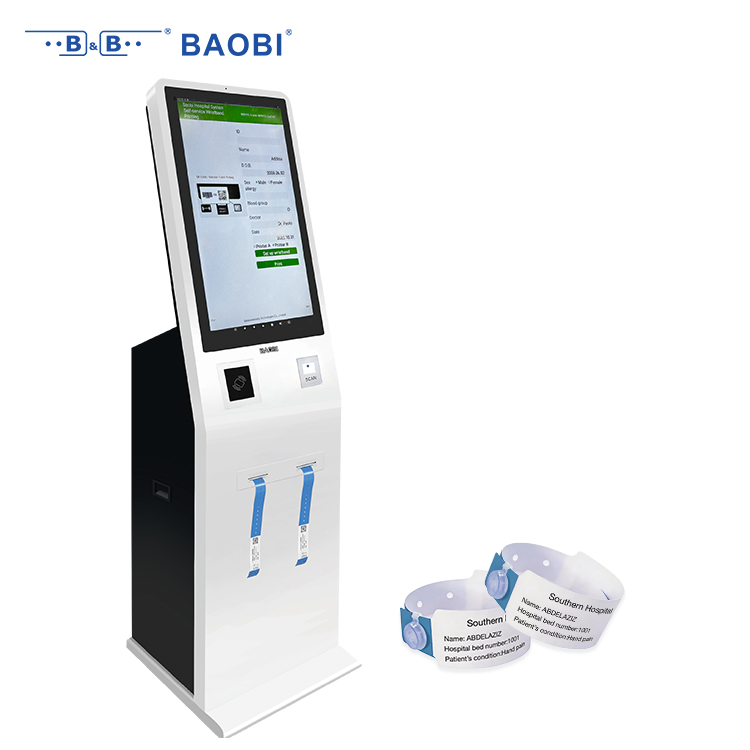
When a hospital kiosk stumbles, the root cause is rarely the touchscreen or the card reader. It's almost always the silent handshake between the kiosk and the electronic health record. Without a clean, real-time EHR connection, even the most elegant check-in flow becomes a dead end—patients get asked for information that's already on file, staff resort to manual workarounds, and the whole promise of self-service collapses into a line at the front desk.
The real test isn't whether an integration exists, but whether it respects the messy reality of hospital data. HL7 feeds, FHIR endpoints, and vendor-specific APIs each have their own quirks: patient matching rules, duplicate record handling, and inconsistent field mappings. A kiosk that can't gracefully handle a mismatched middle initial or a patient who's had three name changes will generate more work than it saves. Projects that thrive are the ones where the EHR integration is treated as a living, breathing contract—constantly monitored, tested against edge cases, and adjusted when the backend shifts.
Budget and timeline often get blamed when kiosk projects stall, but that's a convenient scapegoat. The actual make-or-break moment happens weeks before go-live, when someone asks whether the kiosk can pull allergies, med lists, or upcoming appointments without a human stepping in. If the answer is a hesitant "we'll figure it out," you're already behind. Integrate early, integrate ugly if you have to, but make the EHR the backbone—not an afterthought bolted on at the end.
Designing Self-Service Check-In That Patients Can Complete Without Help
A self-service check-in kiosk only works if every step makes sense to someone who has never used one before. That means replacing clinic jargon with plain phrases like “check your name and birth date” instead of “verify demographics,” and using buttons large enough for trembling hands. The flow should follow the same order patients expect at the front desk: confirm identity, review insurance, sign forms, and then print or send a visit summary. No hidden menus, no swiping carousels, and no pop-up upsells.
Patients get stuck when the machine assumes they understand QR codes, insurance cards, or touchscreen gestures. Offer at least two ways to identify themselves—scanning a driver’s license or typing a name and date of birth—and let them switch between methods without starting over. If a scan fails, show a concrete fix (“turn the card so the barcode faces the red light”) rather than a generic error. A visible “I need help” button should pause the process and alert a staff member, not just display a phone number.
The real test is watching someone who rarely uses kiosks try to check in alone. Record where they hesitate, tap repeatedly, or abandon the screen. Those are the moments to redesign, not to blame the user. Small changes—like adding a progress bar with numbered steps or moving the “finish” button to the lower right where thumbs naturally rest—often remove the need for staff intervention altogether.
What Hospital IT Directors Should Verify Before Signing a Kiosk Contract
Before signing, IT directors need to pin down exactly how the kiosk will talk to existing EHR and patient engagement systems. Ask for a written integration diagram, not a sales slide. If the vendor claims FHIR or HL7 support, request a reference hospital where that connection is live in production. Also verify whether the kiosk can operate with your identity provider through SAML or OAuth, because any fallback to shared logins will create an audit headache.
Security terms should be checked line by line. Confirm where patient data is stored, who can access it, and what happens to that data if the contract ends. The vendor must sign a BAA if protected health information touches the device, and the kiosk itself should support remote wipe, encrypted storage, and timely OS patching. If the vendor cannot show a recent penetration test or SOC 2 report, treat that as a red flag.
Finally, get service-level commitments in writing for hardware repair, software updates, and help desk response. Hospital kiosks sit in high-traffic areas, so a broken screen or a failed card reader cannot wait two weeks. Clarify whether the vendor owns the hardware or you do, and what the exit path looks like—exporting configuration, removing patient data, and avoiding a costly re-implementation if you switch vendors later.
Data Security on Wristband Kiosks: Meeting HIPAA Without Slowing Down
Walk into a busy emergency department and you'll see wristband kiosks doing more than just printing a name. They're checking identities, pulling records, and verifying insurance—all within arm's reach of the next patient in line. That proximity is exactly what makes HIPAA compliance tricky. A screen left open for ten seconds can expose protected health information, so these kiosks need to treat every session as a potential breach point.
The practical fix isn't to bury data behind endless login screens. Instead, the strongest kiosks encrypt patient data both on the device and while it travels to the EHR, then wipe that data the moment a wristband finishes printing. No local cache means there's nothing for a curious passerby to retrieve. Add automatic sign-out after 20 seconds of inactivity and a proximity badge or fingerprint scan for staff re-authentication, and you get a checkpoint that respects the pace of triage without leaving PHI on display.
What often gets overlooked is the audit trail. A wristband kiosk built for HIPAA logs every access, print job, and cancellation, tying each action to a specific staff member and timestamp. That turns a potential violation into a reviewable event, which is far easier to defend than a blank gap in the record. Done right, security becomes a background process—patients still walk away with a wristband in under a minute, while compliance quietly holds the line.
The Hidden Costs of Wristband Kiosk Ownership Hospitals Often Miss
Most budget approvals focus on the sticker price of a wristband kiosk and maybe the initial install, but they rarely account for the consumables that quietly drain operating funds. Proprietary thermal wristband rolls, especially those with embedded RFID or scannable barcodes, cost far more than generic alternatives. Printheads wear out from constant use, sensors drift out of calibration, and every jam or misfeed forces a nurse or registrar to stop what they are doing and print a band manually, doubling the work and delaying patient flow.
Software and integration fees are another overlooked line item. Annual licensing for kiosk management platforms, HL7 interface updates, and cybersecurity patches can rival the original hardware expense within a few years. Every time the electronic health record system gets upgraded, kiosk printer drivers may break, requiring vendor intervention at an hourly rate. Some vendors charge separately for remote monitoring, while others lock hospitals into support contracts that increase sharply after the first term.
Staff time is the quietest cost of all. Patient access teams lose minutes per shift clearing paper jams, replacing ribbon cartridges, or reprinting faded wristbands. Training new employees on kiosk quirks and troubleshooting errors rarely gets a budget line, but it adds up across dozens of shifts. Add in the occasional audit of kiosk performance and the unplanned downtime when a device is out of service, and the total cost of ownership can easily exceed the purchase price before the hardware is even halfway through its useful life.
FAQ
They need to look beyond the hardware itself. The real priorities are integration capability with existing EHR and ADT systems, a track record of uptime in busy clinical settings, and responsive local support. A vendor who understands hospital workflows will save more time than one offering the lowest sticker price.
It's non-negotiable. The terminal must encrypt data at rest and in transit, support role-based access, and comply with HIPAA or equivalent regional regulations. Hospitals should ask for a third-party security audit rather than relying on a vendor's own claims.
A well-designed kiosk should accommodate multiple band sizes and materials without requiring manual adjustment. The best suppliers offer configurable templates for different departments, including NICU-safe bands and antimicrobial options for infection control.
In practice, anything above 0.5% per thousand prints causes visible bottlenecks at admission desks. The supplier should provide real-time monitoring and predictive maintenance alerts so staff can replace consumables before outages occur.
The initial purchase is often less than 30% of five-year costs. Consumables, software licenses, integration fees, and service contracts dominate. Hospitals should request a detailed TCO breakdown and compare per-patient-band pricing rather than just unit price.
It's often the deciding factor in adoption. A kiosk that takes more than 90 seconds to check in a patient will be abandoned by staff. Touchscreen responsiveness, clear step-by-step prompts, and accessibility for patients with limited mobility or vision are essential.
Yes, but not just a one-time session. The supplier should offer role-based training for registration staff, nursing, and IT, plus refresher modules after software updates. A supplier that charges extra for basic training is likely to nickel-and-dime later.
Request a sandbox or pilot deployment with a small number of admissions. The vendor should be able to demonstrate HL7 FHIR or ADT feed integration and show that wristband data flows correctly into the EMR without manual re-entry. If they hesitate, that's a red flag.
Conclusion
A wristband kiosk only earns its place in a hospital when the patient identification workflow is flawless from the first tap. If the kiosk prints a band with mismatched demographics or a stale medical record number, downstream labs and medication scans become risky. That is why the vendor's approach to patient ID verification—whether it relies on a driver's license scan, a confirmation photo, or a live registrar override—has to be ruthlessly clear before rollout. Equally critical is EHR integration. A kiosk that cannot read the scheduling feed, insurance flags, or allergy alerts in real time simply creates a second check-in line. Hospitals should demand a live test with their actual EHR instance, not a sandbox demo. The self-service flow also needs to tolerate human variability: large touch targets, plain language, optional voice prompts, and a fallback to staff help after two failed attempts. Otherwise the kiosk becomes a bottleneck rather than a labor saver.
IT directors should treat the contract as a technical document, not a sales brochure. Verify who owns the kiosk's operating system updates, how quickly the vendor patches vulnerabilities, and whether the device can operate in downtime mode when the network drops. HIPAA compliance is not a checkbox; the kiosk must encrypt wristband data at rest and in transit, purge print queues after each session, and support role-based access without forcing patients to wait through extra authentication steps. Many hospitals overlook the hidden costs that surface after go-live: thermal printer consumables, label stock that jams in humid environments, extended warranty on touchscreens, and software license fees per additional workflow. A lower upfront price often hides per-patient click charges or mandatory cloud subscription tiers. Ask the supplier to itemize five-year total cost, including printer maintenance and after-hours support, before comparing quotes.
Contact Us
Contact Person: Bill Xu
Email: [email protected]
Tel/WhatsApp: 8618688898707
Website: https://www.baobitech.com/